
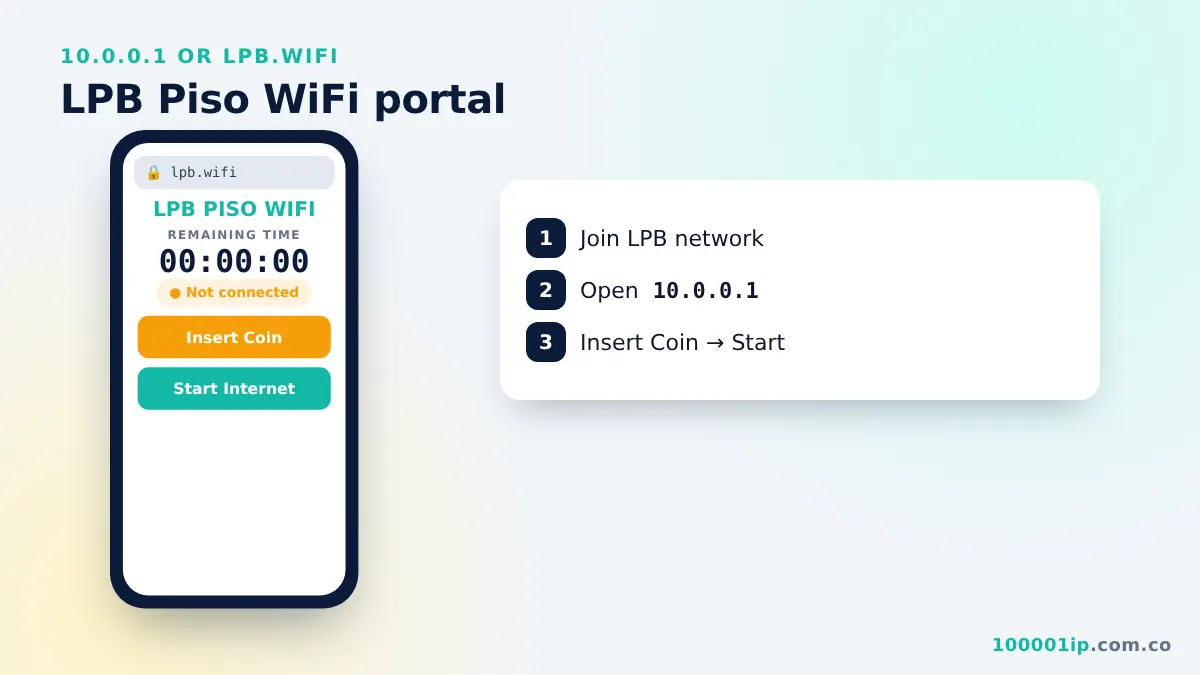
To use Piso WiFi, connect to the vendo's WiFi, open http://10.0.0.1, tap Insert Coin, drop your coins within the countdown, then tap Start Internet. Your remaining time shows on the same portal.
The 10.0.0.1 Piso WiFi portal is the page every coin-operated WiFi customer in the Philippines uses to buy time, check their balance and pause their session. This guide walks through each part of the portal, the rates you will usually see, and what to do when the page refuses to open.
What is Piso WiFi?
Piso WiFi is a pay-as-you-go hotspot. A small vending box (the vendo) is connected to a router and an internet line. Customers drop coins into the slot and receive minutes of internet. The name comes from piso, the Filipino word for one peso. You find these machines in sari-sari stores, apartment hallways, jeepney terminals, schools and barangay halls.
Most vendo software runs its local captive portal on 10.0.0.1. That is why typing the 10.0.0.1 Piso WiFi address while connected to the hotspot shows the coin screen. If you want the background on why this address is used, read what 10.0.0.1 is.
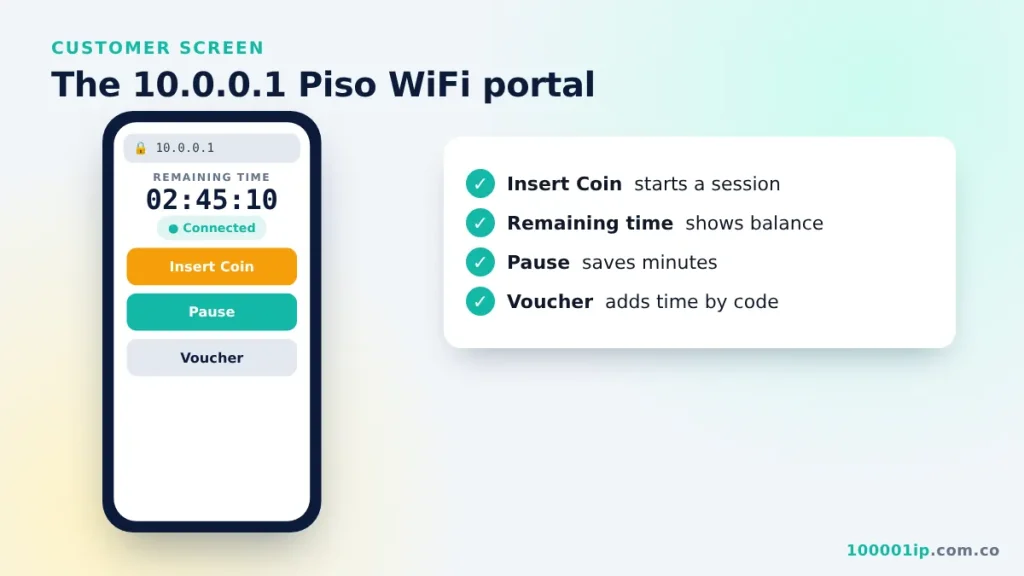
How to use the 10.0.0.1 Piso WiFi portal
- Connect to the Piso WiFi network (the name is usually on a sticker on the machine).
- Turn off mobile data so your phone stays on WiFi.
- Open the 10.0.0.1 Piso WiFi page (
http://10.0.0.1) in Chrome or Safari. Many phones also show a “Sign in to network” pop-up that opens the same page. - Tap Insert Coin. The vendo beeps or shows a countdown, usually 30 to 60 seconds.
- Drop your coins before the countdown ends. Each coin adds time on screen.
- Tap Done or Start Internet. Your status changes to Connected and the timer starts.
Portal buttons explained
| Button / label | What it does |
|---|---|
| Insert Coin | Opens the coin slot for your device for a short countdown. |
| Remaining Time | Your balance in days, hours, minutes and seconds. |
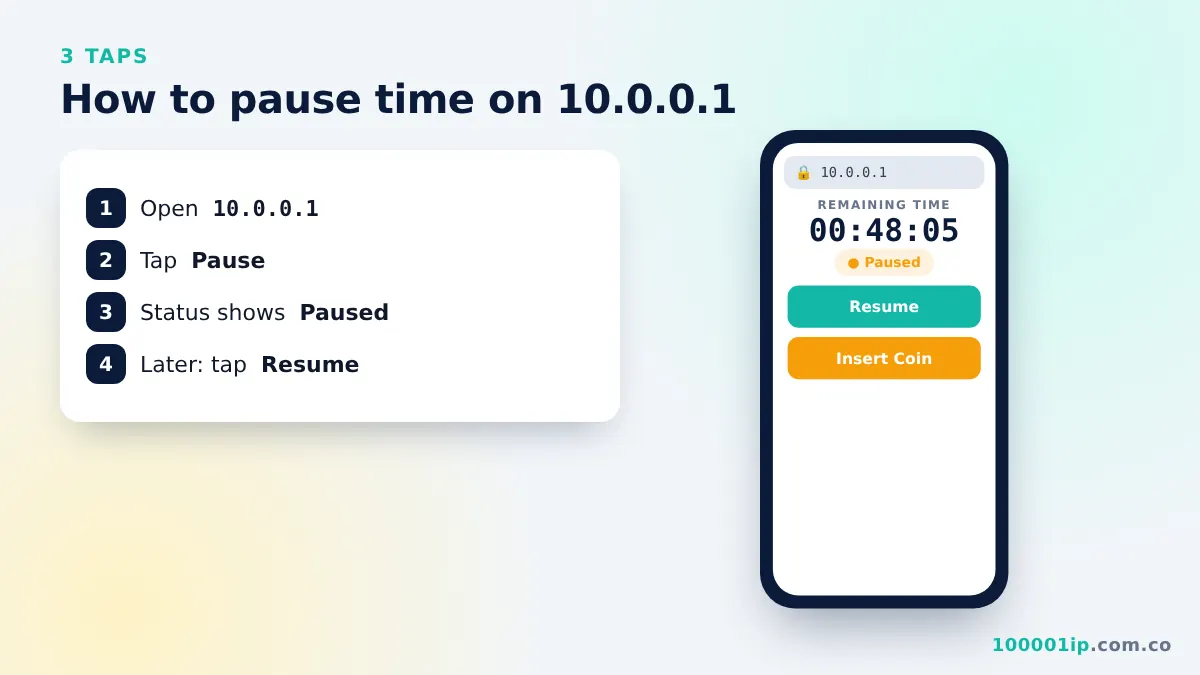
| Pause / Pause Time | Stops the countdown so you keep your minutes. See the pause time guide. |
| Resume / Connect | Restarts the timer and your internet. |
| Voucher | Enter a code to add time without coins. |
| Rates | Shows how many minutes ₱1, ₱5, ₱10 and ₱20 buy. |
Typical Piso WiFi rates
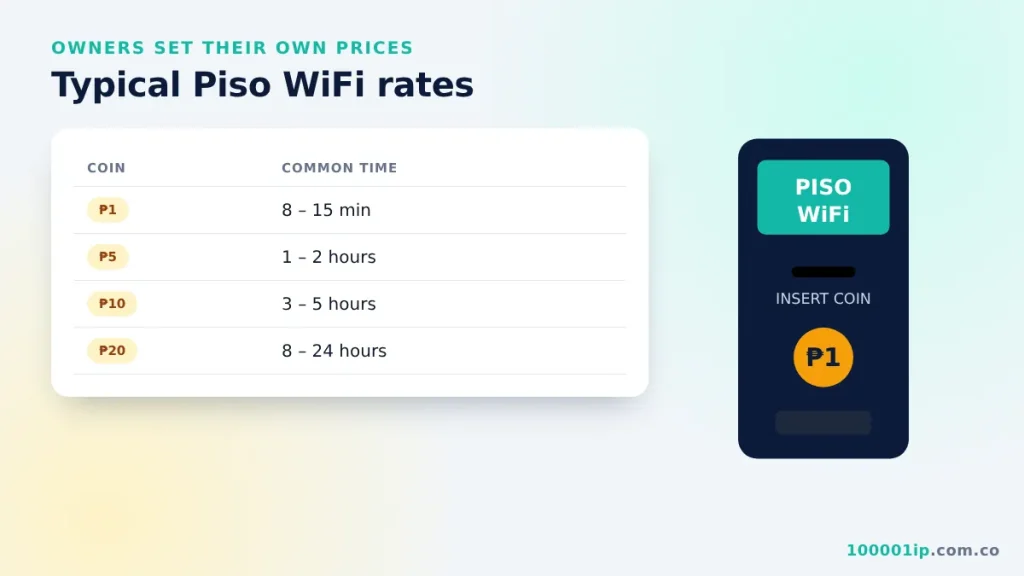
Every owner sets their own prices on the 10.0.0.1 Piso WiFi portal, but rates in most areas fall in this range:
| Coin | Common time |
|---|---|
| ₱1 | 8 to 15 minutes |
| ₱5 | 1 to 2 hours |
| ₱10 | 3 to 5 hours |
| ₱20 | 8 to 24 hours (some offer promos) |
Higher coins often carry a bonus, so one ₱10 coin can give more time than ten ₱1 coins. Check the Rates panel on the 10.0.0.1 Piso WiFi portal before paying.
Brands that use the 10.0.0.1 Piso WiFi portal
- LPB Piso WiFi: one of the most common systems; has its own LPB 10.0.0.1 guide.
- Adopisoft: software for Orange Pi based vendos.
- JuanFi: ESP8266 based vendos that work with MikroTik.
- WiFi5 Soft: another popular vendo platform.
Some MikroTik hotspot setups also use pages like 10.0.0.1/client?page=dashboard or 10.0.0.1/portal.html. Those are covered in the client dashboard guide.
10.0.0.1 Piso WiFi portal not opening
Try these in order: reconnect to the WiFi, turn off mobile data, switch off Private DNS and VPN, type http://10.0.0.1 (not https), clear the browser cache, or forget the network and join again. If none of these work, the machine may be restarting or offline. The full troubleshooting guide has twelve fixes.
Tips to make your coins last longer
- Pause when idle. Tap Pause before you put your phone down. See the pause guide.
- Use bigger coins. ₱5 and ₱10 coins often include bonus minutes.
- Turn off auto-updates for apps and the Play Store / App Store while on Piso WiFi.
- Lower video quality on YouTube and TikTok to reduce buffering on shared connections.
- Keep the same MAC address so your balance is not lost when you reconnect.
Is Piso WiFi safe to use?
Yes, for everyday browsing. The connection is shared and usually open, so treat it like any public WiFi: use apps and sites with https, avoid entering passwords on unfamiliar pages, and never install apps that claim to give free time. The 10.0.0.1 Piso WiFi portal only needs coins or a voucher; it never asks for your Facebook, GCash or bank login.
For owners: managing the vendo
If you own the machine, you manage rates, vouchers and sales from the admin page at 10.0.0.1/admin. Change the default admin password on day one so customers cannot change your rates or give themselves free time.
10.0.0.1 Piso WiFi FAQ
Why does 10.0.0.1 open a Google search instead of the portal?
The address was typed in the search box, or extra characters were added. Tap the address bar, enter only 10.0.0.1 and press Go. If the browser still searches, add http:// in front so it knows you mean a web address.
Can I use my remaining time on another phone?
Usually not. The 10.0.0.1 Piso WiFi portal links your balance to the MAC address of the device that inserted the coins. Some systems let you move time with a voucher code or a transfer button, but that depends on the owner’s settings.
Do I lose my time if the vendo restarts?
Most machines save each user’s balance, so your minutes come back once the vendo is online again. Reconnect to the WiFi, open the portal and check Remaining Time. If the balance is gone, ask the store owner. Owners can see every sale and add time from the admin page.
Why did my coin not register?
The countdown may have ended before the coin dropped, or the coin was bent or too light for the sensor. Tap Insert Coin again and drop the coin while the countdown is running. Only the owner can refund a lost coin, so report it right away.
Do I need an app for the 10.0.0.1 Piso WiFi portal?
No. The portal is a web page served by the vendo itself, so any browser works. Avoid apps that promise free Piso WiFi time. They cannot change the timer on the machine and often carry ads or malware.
Frequently asked questions
How do I insert coins on 10.0.0.1 Piso WiFi?
Open 10.0.0.1, tap Insert Coin, and drop your coins before the countdown ends. Then tap Done or Start Internet.
How much time does ₱1 give on Piso WiFi?
Most machines give 8 to 15 minutes for ₱1, but each owner sets their own rates. Check the Rates panel on the portal.
Why did my Piso WiFi time disappear?
Usually your phone used a random MAC address after reconnecting. Set the network to Use device MAC and open 10.0.0.1 again.
Can I use a voucher instead of coins?
Yes, if the owner sells vouchers. Tap Voucher on the 10.0.0.1 portal and enter the code.